From console.log to Lightweight Observability: Instrument Your App Without External Libraries
console.log isn't just for quick debugging. With a bit of structure, you can turn it into your first frontend observability system: contextual logs, groups, timers, and a reusable mini-logger.
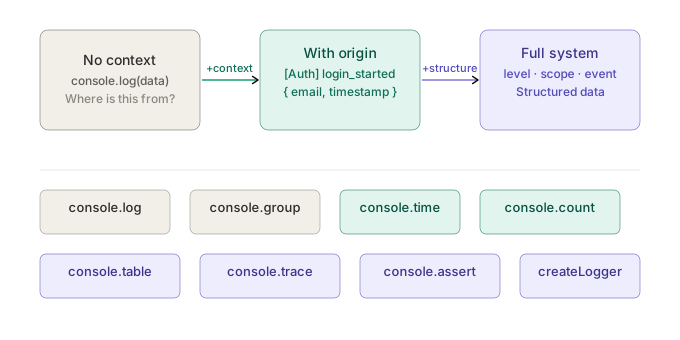
For years, console.log has been treated as throwaway code. We use it to check values, trace execution flow, or figure out why something broke. And the moment it shows up in a code review, it gets deleted like it's technical debt.
But there's another way to look at it.
Used with intention, console.log can be the first step toward something much more useful: real frontend observability.
What Is Observability and Why Does It Matter in Frontend?
Observability is the ability to understand the internal state of a system based on what it exposes externally.
On the backend, this typically means structured logs, metrics, and distributed traces. On the frontend, it's usually just:
console.log("got here");
And that's the problem. Modern frontend:
- manages complex state
- depends on external APIs
- has async logic spread across components
- runs in environments you don't control (your users' browsers)
Without observability, you're guessing what happened when something failed.
The Problem with Traditional console.log
The typical usage works well enough:
console.log(data);
But it doesn't scale:
- no context — where did this log come from?
- no consistency — every developer uses it differently
- noise builds fast
- it says something happened, but not what or why
When you have 20 logs like this in a debugging session, they barely help. With 200, they're useless.
Shifting the Approach: Logs as a System
The idea is simple: stop using console.log as a one-off tool and start using it as an instrumentation system. That means three things: consistency, context, and intention.
1. Add context
Instead of:
console.log(user);
Do this:
console.log("[UserProfile] user loaded", { userId: user.id, user });
Now you have the source (UserProfile), the event (user loaded), and the relevant data. This is starting to look like backend logging.
2. Structured logs
You can go one step further:
console.log(JSON.stringify({
  scope: "UserProfile",
  event: "user_loaded",
  userId: user.id,
  timestamp: Date.now()
}));
This lets you filter easily in DevTools, copy-paste into other tools, and maintain consistency across all logs in the project.
3. Group related flows with console.group
When you have complex multi-step flows:
console.group("[Checkout] submit");
console.log("step 1: validate form", { valid: true });
console.log("step 2: call API", { endpoint: "/orders" });
console.log("step 3: handle response", { orderId: "abc123" });
console.groupEnd();
Groups collapse in DevTools and give you visual hierarchy. Very useful when a flow has five or more steps.
4. Measure performance with console.time
This one is massively underused:
console.time("fetchUser");
await fetchUser();
console.timeEnd("fetchUser");
With this you can spot slow calls, identify bottlenecks, and compare before and after a change.
5. Count events with console.count
Ideal for catching unexpected behavior:
function MyComponent() {
  console.count("render");
  // ...
}
Great for detecting unnecessary re-renders, unexpected loops, or duplicate events firing.
6. Your own mini-logger
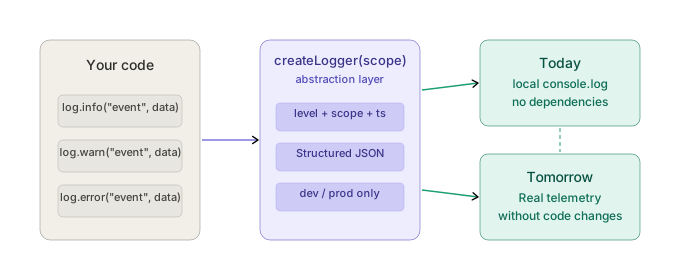
You can wrap all of this into something reusable:
const createLogger = (scope) => ({
  info: (message, data = {}) => {
    if (process.env.NODE_ENV === "development") {
      console.log(JSON.stringify({
        level: "info",
        scope,
        message,
        timestamp: new Date().toISOString(),
        ...data
      }));
    }
  },
  warn: (message, data = {}) => {
    console.warn(JSON.stringify({
      level: "warn",
      scope,
      message,
      timestamp: new Date().toISOString(),
      ...data
    }));
  },
  error: (message, data = {}) => {
    console.error(JSON.stringify({
      level: "error",
      scope,
      message,
      timestamp: new Date().toISOString(),
      ...data
    }));
  }
});
Usage:
const log = createLogger("Auth");

log.info("login_started", { email });
log.error("login_failed", { reason: "invalid_password" });
Now you have levels, consistency, and reusability. When you eventually want to add production telemetry, you change the inside of the logger — the rest of the codebase stays untouched.
7. Simulating traces
You can track a complete flow using a shared ID:
const requestId = crypto.randomUUID();

console.log("[Checkout]", { requestId, step: "start" });
await validateCart();
console.log("[Checkout]", { requestId, step: "cart_validated" });
await callPaymentAPI();
console.log("[Checkout]", { requestId, step: "payment_success" });
This lets you reconstruct exactly what happened in a flow, even without advanced tooling.
Console API Features You Probably Don't Use
The console API has more than most people realize:
// Display data as a table
console.table([
  { name: "Alice", role: "admin" },
  { name: "Bob", role: "viewer" }
]);

// Print the call stack
console.trace("how did I get here?");

// Assert conditions (throws message if false)
console.assert(user.id !== null, "user.id cannot be null", { user });

// CSS styles in the console
console.log("%c[CRITICAL] Payment failed", "color: red; font-weight: bold;", { orderId });

// Mid-measurement checkpoints
console.time("checkout");
await step1();
console.timeLog("checkout", "after step 1");
await step2();
console.timeEnd("checkout");
Where This Approach Has Limits
To be clear about what this doesn't replace:
- production monitoring
- centralized logging platforms
- real error tracking
What it does give you is better local debugging, more clarity during development, and instrumentation discipline. And that discipline is exactly what you need before introducing more complex tooling.
When You Need Something More Robust
When you need to persist logs across sessions, analyze them in production, detect errors automatically, or correlate events across users, it's time to reach for dedicated tools.
Frontend logging libraries:
- Consola — modern, scoped loggers; readable output in development and structured-friendly in CI/production; strong fit for Vite, Nuxt, and other UnJS stacks; works in browser and Node
- Pino — very fast JSON logger; Node-first, with a browser build when you want structured logs in the client
- tslog — TypeScript-native, zero runtime dependencies, pretty printing and stack traces; runs in browsers, Node, Deno, and Bun
Observability platforms:
- Sentry — the standard for error tracking with full context
- Datadog — full-stack, expensive but powerful
- Grafana Faro — open source SDK for frontend RUM and logs
The tool matters less than the discipline behind it. If your logs have no context or structure today, they won't help you in Datadog either.
The Core Idea
console.log isn't just for "seeing things." It's a direct interface between your code and your understanding of the system.
Before installing another dependency, ask yourself: am I fully using what I already have?
Most debugging problems aren't solved with more tools — they're solved with better visibility. And that visibility starts with logs that have context, structure, and intention.
The natural next step is taking this to production: how to turn these logs into real signals you can monitor with OpenTelemetry and Grafana.